

M&A Deal Tracker - Transaction Advisory Intelligence Platform
<!--
Work info
-->
Role:
Analyst
Year:
2026
MA Deal Tracker — Transaction Advisory Intelligence Platform
Author: Praveen Kumar Nutakki Project Type: Business Intelligence and Data Analytics Tools Used: Python, SQL Server, Power BI, DAX, Jira, Git Date: March 2026
What Problem This Project Solves
M&A advisory firms like EY manage anywhere between 20 and 50 live transactions at the same time. Each deal moves through a series of stages from initial sourcing all the way through to closing. Without a centralised tracking system, deals can sit in one stage for months without anyone noticing. Targets get overvalued and slip through to signing. Advisory fees get miscalculated or inflated and nobody catches it until it is too late.
The core problem is visibility. When a deal team is managing 25 simultaneous transactions across different sectors and geographies, it becomes very difficult to know at a glance which deals are moving, which are stalling, and which ones carry financial risk. This project builds a solution to that problem.
What I Built
This is a complete end to end Business Intelligence platform built for a simulated EY transaction advisory environment. It covers the full data pipeline from raw data generation through to an interactive Power BI dashboard with three distinct analytical pages.
The platform gives deal teams and senior partners the ability to monitor every live transaction in real time, identify stalled deals before they lose momentum, catch overvalued targets before they reach signing, and flag advisory fee anomalies before they become billing disputes.
The dashboard was built around three analytical questions that a real M&A deal team asks every week. Where is every deal right now and how much value is in the pipeline. Which deals are moving too slowly and which ones need immediate intervention. Are we pricing targets fairly and are our fees in line with sector norms.
Project Structure
The project contains the following files:
generate_ma_data.py
This Python script is the starting point of the entire project. It generates all six CSV files that form the data foundation. I wrote this because there is no real client data available for a portfolio project and I needed data that behaved like actual M&A transaction data. The script uses Pandas and NumPy to generate 25 synthetic deals across five sectors and six deal stages. Every financial figure was calculated using real world logic. Deal values were derived from sector average deal sizes with random variation applied. EBITDA was back calculated from deal value using sector EV/EBITDA benchmarks. Advisory fees were set between 1.5 and 3 percent of deal value which is the actual market norm. I also deliberately planted three anomalies in the data to test whether the dashboard could detect them automatically. DEAL-007 was given an EV/EBITDA multiple of 31.4x against a sector benchmark of 14.5x. DEAL-014 was given an advisory fee of 7.1 percent of deal value against the 1.5 to 3 percent norm. DEAL-003, DEAL-009 and DEAL-019 were given Due Diligence durations three times the typical benchmark to simulate stalled deals.
ma_queries.sql
This file contains four SQL queries written against the MA_DealTracker database in SQL Server. Each query was written to answer a specific business question. Query one produces a pipeline summary showing deal count, total value and fees by stage and sector. Query two performs stage velocity analysis identifying which deals are taking abnormally long in each stage using a percentage of benchmark calculation and a velocity flag system with four levels from ON TRACK through to CRITICAL STALL. Query three analyses advisory fee ratios across sectors using statistical deviation from the mean to flag outliers. Query four benchmarks each deal's EV/EBITDA multiple against the sector norm and produces a valuation flag showing whether each target is overvalued, fairly valued, above benchmark or a potential opportunity. All three planted anomalies surface correctly when these queries are run.
dim_date.csv
This dimension table contains one row for every calendar date from January 2023 to March 2026, which is 1,186 rows in total. It includes day, month, quarter, year and fiscal period columns as well as flags for month end and quarter end dates. It serves as the date spine for the data model and connects to the fact tables through date ID keys stored as integers in YYYYMMDD format.
dim_sector.csv
This dimension table contains five rows, one for each sector covered in the deal portfolio. The sectors are Technology and Software, Healthcare and Life Sciences, Financial Services, Industrial and Manufacturing, and Consumer and Retail. Each row includes the sector's EV/EBITDA benchmark multiple and average deal size which are used in the valuation analysis. The EY practice area is also included for each sector.
dim_stage.csv
This dimension table contains six rows representing the six stages a deal moves through. The stages are Sourcing, Initial Review, Due Diligence, Negotiation, Signing and Closed. Each stage has a typical duration in days which serves as the benchmark for the stage velocity analysis. This table is central to identifying stalled deals because every actual duration in the fact table is compared against these benchmarks.
dim_deal.csv
This is the core dimension table containing one row per deal, 25 rows in total. It holds the deal's financial profile including deal value, EBITDA, EV/EBITDA multiple, advisory fee, current stage and deal status. It also records the target company name, acquirer name, sector, geography, deal type and lead advisor. Two anomalies were planted directly in this table. DEAL-007 had its EV/EBITDA multiple manually set to 31.4x and DEAL-014 had its advisory fee manually set to 7.1 percent of deal value.
fact_deal_activity.csv
This is the primary fact table containing 92 rows, one row per deal per stage that each deal has passed through. It records the entry date, exit date, days spent in each stage and whether that stage is the deal's current stage using a binary flag. It also carries a status note column which is either ON TRACK or STALLED. Three rows in this table are marked as STALLED for DEAL-003, DEAL-009 and DEAL-019 where the Due Diligence duration was set to approximately three times the 45 day benchmark. This table is the foundation for the stage velocity analysis on Page 2 of the dashboard.
fact_fees_monthly.csv
This fact table contains 155 rows of monthly fee accrual data. Each deal's total advisory fee is spread across the months it is active in the pipeline. This table drives the monthly fee trend line chart on Page 3 of the dashboard and gives leadership visibility into how revenue is building up across the portfolio over time.
MA_DealTracker_BuildGuide.docx
This document was written as a complete reference guide for building the Power BI dashboard. It covers the full data model with all six tables and their relationships, the complete DAX measure library with 12 measures, the three page dashboard layout with every visual and slicer specified, and portfolio notes covering the GitHub README, Framer portfolio description and LinkedIn post. This document was the blueprint I followed to build the dashboard from start to finish.
Data Model
The data model follows a standard star schema design. The two fact tables sit at the centre and all four dimension tables connect to them through foreign key relationships. The relationships are as follows.
dim_deal connects to fact_deal_activity through deal_id on a one to many basis. dim_deal connects to fact_fees_monthly through deal_id on a one to many basis. dim_stage connects to fact_deal_activity through stage_id on a one to many basis. dim_sector connects to fact_deal_activity through sector_id on a one to many basis. dim_sector connects to dim_deal through sector_id on a one to many basis. dim_date connects to fact_deal_activity through entry_date_id on a one to many basis.
Dashboard Pages
Page 1 — Pipeline Overview
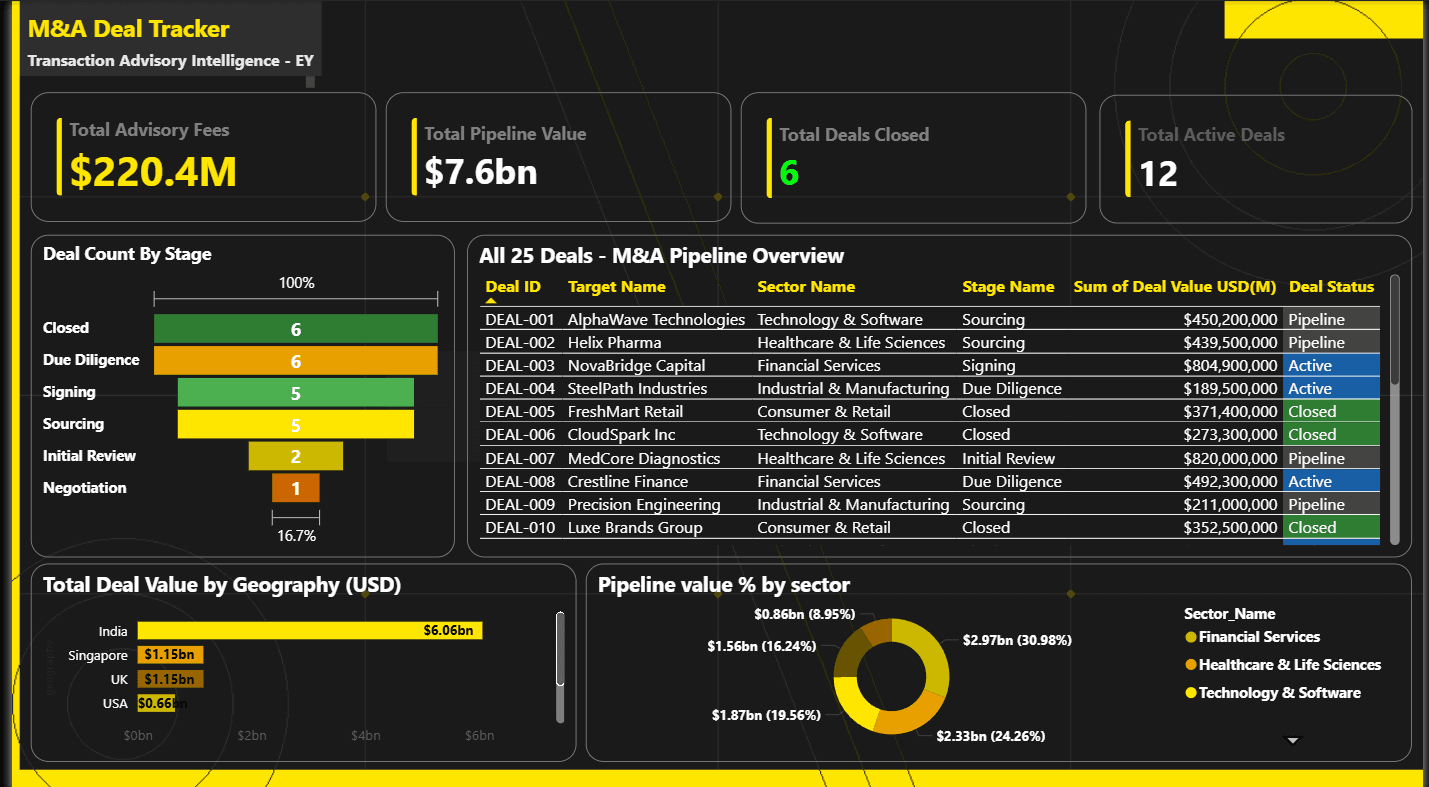
This page was designed to give the CFO and senior partners a complete picture of the deal portfolio in under 30 seconds. It shows total pipeline value, total deals active, total advisory fees and deals closed as KPI cards across the top. Below that are a funnel chart showing deal count by stage, a donut chart showing pipeline value distribution by sector, a bar chart showing deal value by geography, and a full table of all 25 deals with conditional formatting applied to the deal status column. Active deals are highlighted in blue, closed deals in green and pipeline deals in grey. Three slicers allow filtering by sector, geography and deal status.
Page 2 — Deal Intelligence and Stage Velocity
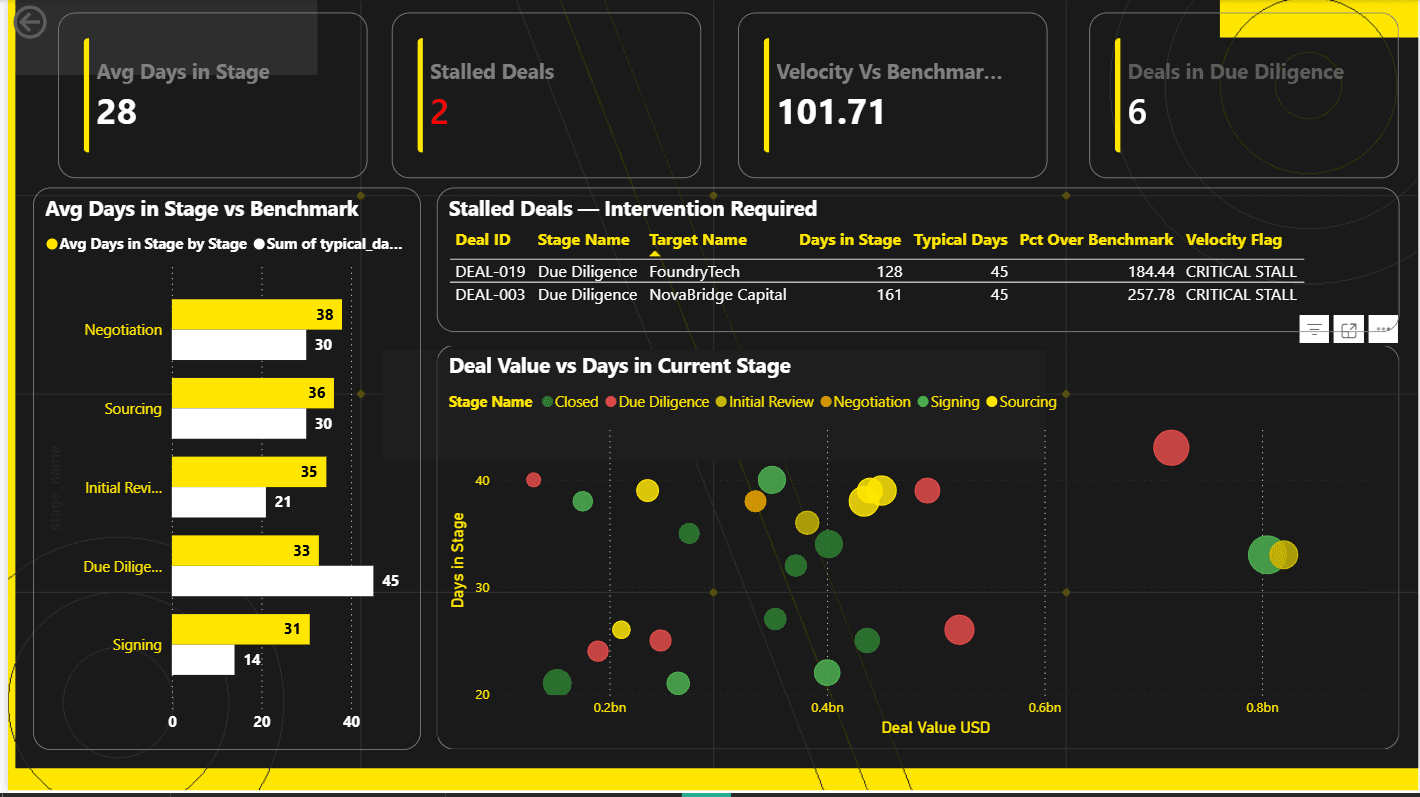
This page is the operational dashboard for the deal team. It is designed to be reviewed every Monday morning to identify which deals need attention that week. The four KPI cards show average days in current stage, stalled deals count highlighted in red, velocity versus benchmark percentage and deals currently in Due Diligence. A clustered bar chart shows actual average days per stage alongside the benchmark days for direct comparison. A scatter plot shows every deal as a bubble positioned by deal value on the x axis and days in current stage on the y axis with bubble size representing advisory fee. The stalled deals table shows only the two confirmed CRITICAL STALL deals with their exact overage percentage and recommended action.
Page 3 — Valuation and Fee Intelligence
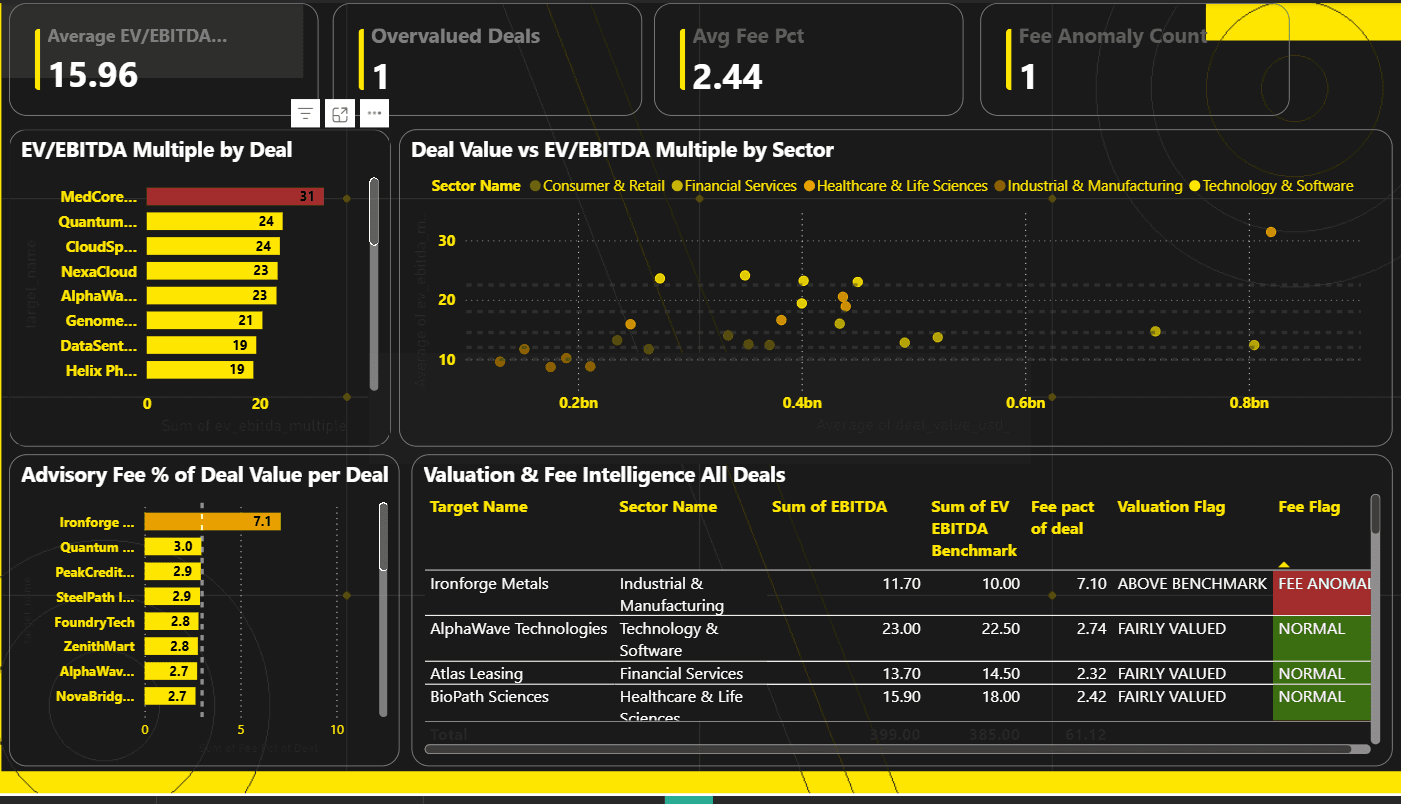
This is the anomaly detection page. It surfaces overvalued targets and fee anomalies automatically using DAX measures and calculated columns. The four KPI cards show average EV/EBITDA multiple, overvalued deals count in red, average fee percentage and fee anomaly count in red. A bar chart shows EV/EBITDA multiples for every deal with DEAL-007 spiking visually in red at 31.4x. A scatter plot shows deal value against EV/EBITDA multiple coloured by sector with benchmark reference lines for each sector. A bar chart shows advisory fee percentage per deal with DEAL-014 spiking at 7.1 percent against the 3 percent reference line. A valuation table covers all deals with conditional formatting flagging overvalued deals in red, above benchmark deals in amber and fairly valued deals in green.
Key Findings
Three deals, DEAL-003, DEAL-009 and DEAL-019, stalled in Due Diligence at approximately three times the typical 45 day duration. DEAL-003 spent 161 days in Due Diligence which is 257 percent over benchmark. DEAL-019 spent 128 days which is 184 percent over benchmark. Both were flagged as CRITICAL STALL with a recommended action of escalate to senior advisor.
DEAL-007, MedCore Diagnostics, was valued at 31.4x EV/EBITDA against a Healthcare sector benchmark of 18.0x. This represents a 74 percent premium to the sector benchmark and is flagged as OVERVALUED on the dashboard.
DEAL-014, Ironforge Metals, carried an advisory fee of 7.1 percent of deal value against the sector norm of 1.5 to 3 percent. This is flagged as a FEE ANOMALY requiring review before the invoice is raised.
Difficulties I Faced
The biggest technical challenge was the Power BI data model. When I connected the six tables, Power BI created ambiguous relationship paths between fact_deal_activity and dim_stage because there were two possible routes through the model. This caused RELATED functions in calculated columns to fail silently and return blank values instead of throwing a clear error. The fix was to replace RELATED with LOOKUPVALUE in the calculated columns, which bypasses the relationship engine entirely and does a direct key based lookup instead.
The second challenge was the stalled deals table. The three stalled deals had already moved past Due Diligence by the time the dashboard was built, so their is_current_stage flag was 0. This meant any filter on is_current_stage equal to 1 would hide the stalled rows completely. The correct approach was to filter the table on status_note equal to STALLED rather than on the current stage flag, which surfaces the historical stall data regardless of where the deal currently sits in the pipeline.
The third challenge was formatting the KPI cards. Power BI's display unit system assumes raw dollar values, but the data was stored in millions. Setting display units to Billions without accounting for this resulted in values showing as near zero. The cleanest solution was to multiply all monetary columns by 1,000,000 in Power Query to convert them to actual dollar values, then set display units to Billions in the card visuals.
The fourth challenge was the Monthly Fees line chart. The original DAX measure used USERELATIONSHIP to link dim_date to fact_fees_monthly through the fiscal_period column. This failed because fiscal_period in dim_date is not unique since every day in January 2024 shares the same fiscal_period value, making it ineligible for the one side of a relationship. The fix was to remove the USERELATIONSHIP approach entirely and simply use fact_fees_monthly fiscal_period directly on the x axis of the line chart.
Tech Stack
Python with Pandas and NumPy for data generation. SQL Server and SSMS for database creation, table management and analytical queries. Power BI Desktop for data modelling, DAX measures and dashboard development. DAX for calculated columns, measures and conditional formatting logic. Jira Kanban board for project tracking. Git and GitHub for version control and portfolio publishing.
How to Run This Project
Clone the repository to your local machine. Run generate_ma_data.py to regenerate all six CSV files. Open SSMS and run the CREATE DATABASE statement to set up MA_DealTracker. Import all six CSV files into the database using the Import Flat File wizard. Run ma_queries.sql to verify the analytical queries produce correct results including all three anomaly detections. Open the Power BI file, refresh the data connection, and all three dashboard pages will populate with live data from the SQL Server database.
Contact
Praveen Kumar Nutakki Portfolio: praveenkumar66.framer.website GitHub: http://github.com/praveen66-BA/MA-Deal-Tracker---EY-Project/edit/main/README.md Email : praveennuthakki666@gmail.com Phone No : 9505802641